MARSZEWC.PL
VOL. 01 / NO. 01
· dział skryptów · · scripts section ·
GDYNIA · POLSKA
54° 31′ N · 18° 32′ E
WARSZTAT · NARZĘDZIA WORKSHOP · TOOLS

Piszę skrypty
do Adobe InDesign.

I write scripts
for Adobe InDesign.

Narzędzia, które piszę dla siebie i udostępniam za darmo.

Tools I write for myself and share for free.

Wszystkie skrypty są w plikach .jsx. Instalacja sprowadza się do skopiowania pliku do folderu ze skryptami InDesigna.

Every script is a .jsx file. Installing one is just a matter of copying it into InDesign's scripts folder.

¶ Lista skryptów

¶ Script list

01

Paragraph Keep Options.

InDesign CC+ · .jsx

Podgląd i ustawianie opcji „Keep" bieżącego akapitu (Keep All Lines, Keep with Previous/Next, Keep Lines Start/End oraz Start Paragraph). Przyciski „Set Keep Start/End from cursor position" ustawiają liczbę wierszy trzymanych razem od początku lub końca akapitu, licząc od wiersza z kursorem.

View and set the current paragraph's keep options (Keep All Lines, Keep with Previous/Next, Keep Lines Start/End, Start Paragraph). The "Set Keep Start/End from cursor position" buttons set how many lines are kept together from the start or end of the paragraph, counting from the cursor's line.

NB. Umieść kursor w akapicie, kliknij „Refresh values", aby wczytać wartości. Przyciski +/− pobierają wartość z bieżącego akapitu i ją zmieniają.

NB. Place the cursor in a paragraph and click "Refresh values" to load them. The +/− buttons read the current paragraph's value and change it.
↓ Pobierz .jsx↓ Download .jsx
01 · Paragraph Keep Options.jsx
02

Find Stacked Repeated Words.

InDesign CC+ · .jsx

Wyszukuje „lustra" — te same wyrazy (lub ustaloną liczbę znaków) powtórzone na początkach albo końcach sąsiadujących wierszy. Kliknięcie wyniku podświetla powtórzony wyraz.

Finds "mirrors" — the same words (or a set number of characters) repeated at the start or end of adjacent lines. Clicking a result highlights the repeated word.

NB. Umieść kursor w tekście, uruchom, ustaw opcje (całe wyrazy / liczba znaków, ignorowanie interpunkcji, wielkość liter, zakres) i przejrzyj listę.

NB. Place the cursor in text, run, set the options (whole words / character count, ignore punctuation, case, scope) and review the list.

↓ Pobierz .jsx↓ Download .jsx
02 · Find Stacked Repeated Words.jsx
03

Find Footnotes Split Across Pages.

InDesign CC+ · .jsx

Znajduje przypisy, które zaczynają się na jednej stronie, a kończą na następnej. Wyniki można ograniczyć do przypisów o określonej liczbie wierszy.

Finds footnotes that start on one page and continue onto the next. Results can be limited to footnotes with a given number of lines.

NB. Otwórz dokument i uruchom.

NB. Open a document and run.

↓ Pobierz .jsx↓ Download .jsx
03 · Find Footnotes Split Across Pages.jsx
04

Table Formatting Panel.

InDesign CC+ · .jsx

Paleta z przyciskami do szybkiego formatowania zaznaczonych komórek/tabeli: ukrywanie poziomych linii wewnętrznych (wszystkich lub nieparzystych), górny odstęp komórek (0 / 0,5 / 1 mm oraz 0 mm w wierszach parzystych), wysokość wierszy 2 mm.

A palette of buttons for quick formatting of selected cells/table: hide inner horizontal lines (all or odd), top cell inset (0 / 0.5 / 1 mm, and 0 mm in even rows), row height 2 mm.

NB. Zaznacz komórki lub tabelę, kliknij wybrany przycisk.

NB. Select cells or a table, click a button.

↓ Pobierz .jsx↓ Download .jsx
04 · Table Formatting Panel.jsx
05

Send Styles To Find-Change.

InDesign CC+ · .jsx

Przenosi styl akapitowy i/lub tekstowy spod kursora do okna Find/Change. Wybierasz, co przenieść (do pola Find i/lub Change), czy wyczyścić pola tekstowe oraz czy dotyczy to zakładki Text i/lub GREP. Ustawienia są zapamiętywane.

Sends the paragraph and/or character style from under the cursor into the Find/Change dialog. You choose what to send (to the Find and/or Change field), whether to clear the text fields, and whether it applies to the Text and/or GREP tab. Settings are remembered.

NB. Otwórz paletę, zaznacz opcje (przyciski „Wszystko"/„Nic" zaznaczają/odznaczają cztery style), ustaw kursor w tekście i kliknij „Przenieś". Paletę można zostawić otwartą i stosować wielokrotnie.

NB. Open the palette, set the options ("Wszystko"/„Nic" = All/None toggle the four styles), place the cursor in text and click "Przenieś" (Transfer). The palette can stay open and be reused.

↓ Pobierz .jsx↓ Download .jsx
05 · Send Styles To Find-Change.jsx
06

Set Next Style Chain From Selection.

InDesign CC+ · .jsx

Na podstawie kolejności stylów w zaznaczonych akapitach buduje łańcuch „Next Style" (każdy styl wskazuje na następny w sekwencji).

From the sequence of styles in the selected paragraphs, builds a "Next Style" chain (each style points to the next one in the sequence).

NB. Zaznacz co najmniej dwa akapity o różnych stylach i uruchom.

NB. Select at least two paragraphs with different styles and run.

↓ Pobierz .jsx↓ Download .jsx
06 · Set Next Style Chain From Selection.jsx
07

Convert Numbered List.

InDesign CC+ · .jsx

Ujednolica punktory i numerację wyliczeń według wybranego schematu, osobno dla maksymalnie 5 poziomów zagnieżdżenia — liczby (1), 1.), litery (a), a.), półpauzy (–) lub punkty (•). Zachowuje treść, formatowanie znakowe i styl akapitu, zmieniając wyłącznie sam punktor. Potrafi też dodać punktory akapitom, które je utraciły (np. po wklejeniu z Worda).

Unifies list bullets and numbering to a chosen scheme, independently for up to 5 nesting levels — numbers (1), 1.), letters (a), a.), en dashes (–) or bullets (•). It preserves the text, character formatting and paragraph style, changing only the bullet itself. It can also add bullets to paragraphs that lost them (e.g. after pasting from Word).

NB. Umieść kursor w wyliczeniu lub zaznacz akapity, wybierz typ punktora dla poziomów oraz zakres (tylko zaznaczone / z dodawaniem brakujących / cała lista od kursora) i kliknij „Konwertuj". Wbudowany przycisk „Instrukcja" opisuje resztę.

NB. Place the cursor in a list or select paragraphs, choose the bullet type per level and the scope (selection only / with missing bullets added / whole list from the cursor), then click "Konwertuj" (Convert). The built-in "Instrukcja" (Manual) button explains the rest.

↓ Pobierz .jsx↓ Download .jsx
07 · Convert numbered list.jsx
08

Scripts Panel.

InDesign CC+ · .jsx

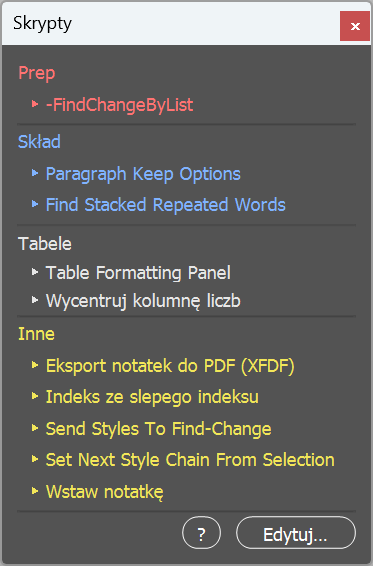
Paleta ze skryptami InDesigna uporządkowanymi w grupy i wyróżnionymi kolorami — bez potrzeby szukania ich w panelu Skrypty. Podział na grupy i przypisane im kolory ustala się samodzielnie.

A palette of your InDesign scripts, sorted into color-coded groups — no more hunting through the Scripts panel. You set up the groups and their colors yourself.

NB. Uruchom, aby otworzyć paletę; grupy, kolory i przypisane skrypty ustawisz przyciskiem „Edytuj…".

NB. Run it to open the palette; set up the groups, colors and assigned scripts with the "Edytuj…" (Edit…) button.

↓ Pobierz .jsx↓ Download .jsx
08 · Scripts Panel.jsx
09

Center Numeric Column.

InDesign CC+ · .jsx

Skrypt elegancko centruje w tabeli kolumnę liczb wyrównanych do prawej. Odszukuje najdłuższą liczbę, centruje ją w komórce, a pozostałe wyrównuje do niej tak, by ich cyfry trzymały wspólną prawą krawędź. W efekcie kolumna jako całość wygląda na wycentrowaną, a liczby pozostają czytelnie wyrównane względem siebie.

This script neatly centers a column of right-aligned numbers in a table. It finds the longest number, centers it in its cell, and aligns the remaining numbers to it so that their digits share a common right edge. As a result, the column as a whole appears centered, while the numbers remain clearly aligned with one another.

NB. Zaznacz komórki kolumny z liczbami wyrównanymi do prawej i uruchom.

NB. Select the cells of a right-aligned numeric column and run.

↓ Pobierz .jsx↓ Download .jsx
09 · Center numeric column.jsx

¶ Licencja i odpowiedzialność

¶ License and liability

Skrypty są darmowe. Możesz ich używać w pracy komercyjnej. Bez gwarancji — testuj na kopii dokumentu.

The scripts are free. You may use them in commercial work. No warranty — test on a copy of your document.

Znalazłeś błąd albo masz pomysł na ulepszenie lub na skrypt, którego tu nie ma? Napisz.

Found a bug, or have an idea to improve them or for a script that isn't here? Write to me.

Wróć do strony głównej →

Back to the home page →